
APC vs UPC Fibre Connectors: A Practical Compatibility Guide for Network Teams

A replacement patch cord arrives at a site. The connector appears to fit the adapter, the length looks right and the cable is yellow. Is that enough to connect it?
No. Fibre connector compatibility involves more than shape or cable colour. The connector format, end-face polish, fibre specification and equipment interface all need to match the intended connection.
For network installers, procurement teams and maintenance staff, APC versus UPC is one of the most useful distinctions to understand. It can prevent an apparently simple replacement from creating a difficult fault.
This guide explains the difference in practical terms, how to describe a patch cord accurately and what to check before using a spare. It complements the equipment and component datasheets; it does not replace them.
The short answer: match the polish at every mating point
APC means angled physical contact. UPC means ultra physical contact. They describe different connector end-face polishing arrangements. APC uses an angled end face to manage reflected light; UPC uses a different physical-contact geometry.
Do not mate an APC connector directly with a UPC connector. A connector body that fits an adapter does not establish that the two optical end faces are compatible.
A patch cord can legitimately have APC at one end and UPC at the other when each end connects to its matching interface. That is different from bringing an APC and UPC end face together at the same mating point.
The Fiber Optic Association's connector guidance explains connector types and the distinction between polished interfaces. Always confirm the specification of the actual components.
1. Separate connector shape from connector polish
SC and LC describe connector formats. APC and UPC describe polish types. These are separate parts of the product description.
For example, “SC” alone does not tell a buyer whether the required interface is SC/APC or SC/UPC. A request for a “fibre patch cord” leaves even more unanswered.
The same principle applies when reading an equipment port description. The team needs the complete interface specification rather than an approximate visual match.
This distinction is especially useful when different network sections use different equipment. A technician may be familiar with one connector format and assume the polish is also the same throughout the installation. Verify the actual interface instead of carrying that assumption from another rack.
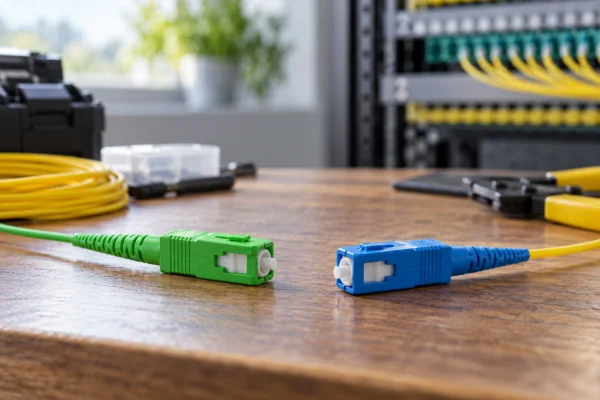
AI-generated conceptual comparison of separate green and blue connector bodies. It is not a precision drawing of end-face geometry; do not mate APC and UPC interfaces.
2. Why reflected light matters
An optical connection can lose some transmitted power and reflect some light back towards the source. These are related to connection quality but are not the same measurement.
Insertion loss describes power lost through the connection. Return loss is used to express reflected-power behaviour; under the usual return-loss convention, a higher positive value indicates less reflected power. Equipment requirements determine what is acceptable.
APC interfaces are commonly chosen where reflection performance is important. That does not mean APC is automatically the correct replacement for every UPC interface. The system must be designed and connected for the specified components.
Avoid selecting a connector from a single headline number without understanding the application, test conditions and mating configuration. A component specification must be interpreted in the context of the complete link.
3. Colour helps, but it is not a complete specification
Green connector bodies commonly indicate APC, while blue is commonly associated with single-mode UPC. These conventions are useful clues, not a substitute for product identification.
Ageing labels, mixed stock, unusual components or incorrect packaging can make visual assumptions unreliable. Check the part number, packaging description, supplier documentation and equipment specification.
Cable-jacket colour is also insufficient by itself. A yellow cable may suggest a common single-mode convention, but it does not establish the complete fibre, connector or application specification.
The FOA's patch-cord reference provides background on patch-cord selection and identification. Use that background alongside the actual manufacturer's data.
4. Read a patch-cord requirement from end to end
A useful purchase description identifies both ends explicitly. State the connector format and polish for end A, then the connector format and polish for end B.
Next, specify the required fibre type, simplex or duplex arrangement, length and any jacket or environmental requirements relevant to the installation. Include polarity requirements where applicable.
For example, a request might identify an SC/APC interface at one end and an SC/UPC interface at the other, with the remaining specifications supplied from the approved design. The labels describe the two ends of one cord; they do not authorise an APC-to-UPC mating interface.
Procurement should resolve unclear descriptions before ordering. “Same as last time” is weak documentation when the previous item may have served a different port or when the equipment has changed.
5. Build a simple compatibility check before connection
Start with the equipment port specification. Identify the required connector, polish and fibre characteristics. Then check the adapter or patch-panel interface and the cord that will connect to it.
Treat each mating point separately. A link may contain several adapters and patch cords, so a correct connector at the equipment end does not prove every intermediate connection is correct.
Inspect the physical condition and follow the appropriate fibre inspection and cleaning procedure. Compatibility does not make a dirty or damaged connector acceptable.
Use the site's optical-safety procedure. Never look into a fibre or port to determine whether it is active, and use inspection equipment appropriate for the application and safety arrangements. Invisible optical radiation cannot be assessed by eyesight.
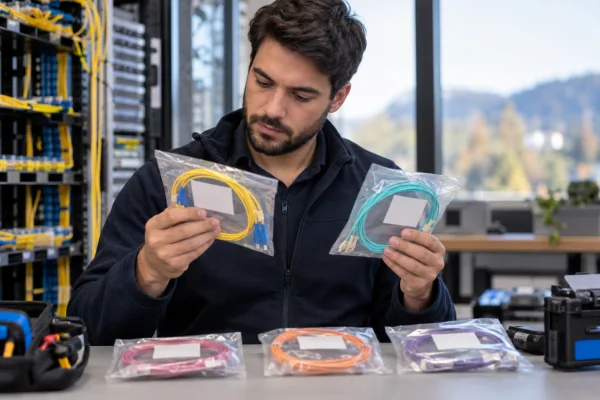
AI-generated editorial illustration of checking packaged patch cords. The scene does not verify the specification of any real component.
6. A fictional troubleshooting example
Consider a maintenance team replacing a damaged cord in a small access-network cabinet. The spare has the same connector shape and length, so it initially appears suitable.
Before installation, the technician checks the port documentation and notices that the spare's polish specification differs from the required mating interface. The team stops the substitution and identifies the correct component.
They also discover that the spare-stock record lists only “SC patch cord.” The stock description is updated to identify both ends and the relevant fibre details.
This is an illustrative case, not a reported Jekath customer incident. No failure rate or performance improvement is claimed. The lesson is that a precise description can prevent a mismatch before it becomes a field problem.
A second lesson concerns troubleshooting discipline: when a connection performs poorly, do not immediately assume the cable length or transceiver is responsible. Review compatibility, cleanliness, condition and the documented link requirements in a structured way.
7. Avoid the “adapter will convert it” assumption
An adapter generally aligns compatible connectors; it should not be assumed to convert an incompatible polish combination into a valid optical interface.
If a proposed connection involves unlike connector formats or different polish requirements at opposite ends of a link, consult the equipment and component documentation for the appropriate assembly. A correctly specified hybrid patch cord may be suitable, depending on the design.
Do not force a connector, modify a component or use an unverified adapter because the arrangement looks mechanically possible. Physical fit and optical suitability are different questions.
Where the documentation is unclear, send the supplier the equipment model, port specification and intended connection details. A photograph can help identify the situation, but a photograph alone may not establish the required optical specification.
Specify both ends, then verify every mating point.
Editorial field reminder, not a quotation attributed to a customer.
8. Organise spares so the correct choice is easy
Separate stock by complete specification, not just connector colour. Use clear labels that remain readable when items are removed from their shipping cartons.
Keep protective caps and packaging as appropriate, and handle components according to the supplier's instructions. A cap does not prove that an end face is clean; inspection and cleaning requirements still apply before connection.
Record the approved part number and the applications for which the item is intended. Avoid mixing unverified returns with known-good stock. If a cord has an uncertain history or damaged identification, establish its suitability before putting it back into service.
For sites with several equipment types, a simple compatibility reference can help. It should link equipment interfaces to approved spare specifications and remain under the same document-control discipline as other network records.

AI-generated conceptual illustration of organised fibre spares and patching. It is not a wiring instruction or an actual Jekath installation.
9. Keep testing tied to the link requirements
After an approved replacement, verify the connection using the test method and acceptance criteria appropriate to the system. A link light alone may not provide all the evidence required by the project.
Record the component replaced, the location, the reason for replacement and the relevant results. This helps another technician understand what changed if a later issue appears.
Do not compare measurements taken with different methods or conditions without accounting for those differences. Test equipment setup, reference arrangements and the link configuration matter.
If results remain outside requirements, investigate systematically rather than repeatedly changing components without a record. Good documentation reduces uncertainty for both the field team and the supplier assisting with the issue.
Frequently asked questions
Can SC/APC and SC/UPC be connected because both are SC?
No. The connector format alone does not establish polish compatibility. Do not directly mate APC and UPC end faces.
Is an APC-to-UPC patch cord always wrong?
No. A cord with different polish types at opposite ends can be appropriate when each end mates with its matching interface and the complete assembly meets the design requirements.
Is green always enough to identify APC?
Treat colour as a clue. Verify the part specification and intended interface, especially when stock history or labelling is uncertain.
Is APC always better than UPC?
The correct choice is the one required by the system. Reflection performance is one consideration, but an incompatible replacement is not an upgrade.
What should I send a supplier when asking for a replacement?
Provide the equipment or port details, both connector-end requirements, fibre specification, length, arrangement and any relevant environmental or jacket requirements. Include the existing part number if available.
Make the next order unambiguous
When discussing fibre connectivity with Jekath Fibertronics, a complete end-to-end description gives the team a stronger basis for checking the requested component.
The most useful habit is also a simple one: never let a familiar connector shape replace a specification check. A few precise details before ordering or connecting can save a much longer investigation later.