
The link is up again. What actually failed?
A network team receives an alert: an uplink dropped and recovered. By the time someone checks the rack, the port is green and the optical readings look normal. A patch cord is changed as a precaution. The next day, the same problem returns, but the team now has an extra variable and very little evidence about the original failure.
Intermittent fiber-link troubleshooting needs a different rhythm from a one-time installation test. The immediate priorities are to preserve the event, identify the exact link and separate what was observed from what is merely suspected. A successful recovery does not explain the cause, and a normal reading taken later does not describe the failure moment.
This guide focuses on active point-to-point Ethernet links and optical transceiver diagnostics. Passive optical networks and other architectures have their own measurement requirements. It is a practical investigation framework for network and field teams, not a replacement for the equipment manufacturer’s procedures or an instruction to interrupt a live service.
Key takeaways
Capture both endpoints and the failure time before changing hardware. Treat digital optical monitoring as useful evidence, not a certificate that the whole fiber path is healthy.
Use the exact module and host specifications, investigate transmit and receive directions separately, and change one variable at a time. Plan any intrusive measurement or substitution within the authorised maintenance process.
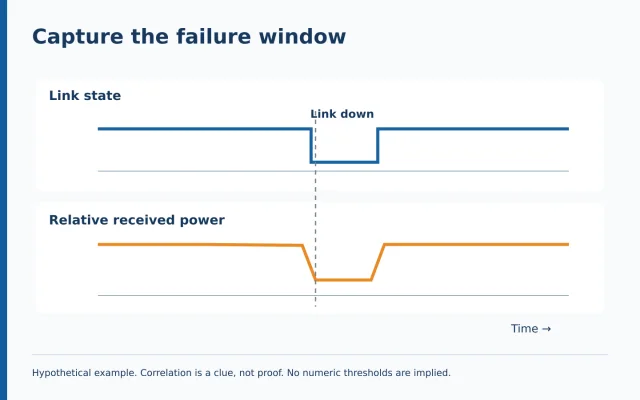
Capture the failure window, not just the recovery
Start by recording when the interruption occurred, how long it lasted and which services were affected. Confirm whether the observation was a physical link-down event, an interface error increase or an application complaint. These are different symptoms, and an application outage does not automatically establish an optical failure.
Preserve relevant logs and counter readings at both ends, including their timestamps and time zones. Check whether the device clocks agree closely enough to correlate the event. If one log is several minutes out, an apparent sequence can be misleading. Record the offset instead of silently aligning events by guesswork.
Cisco’s fiber-link troubleshooting guidance notes that optical diagnostic readings may appear acceptable while an interface is working yet differ when it fails. That makes event-time evidence valuable. Ask the network owner what supported monitoring can capture without affecting service; do not add scripts, enable intrusive diagnostics or alter the production configuration casually.
Identify the exact endpoints before interpreting numbers
Write down the host devices, port identifiers, software versions and exact transceiver part numbers. Include both ends of the link. Record the intended speed, fiber type, wavelength arrangement and any intermediate patching or optical components. A description such as “single-mode SFP” leaves too many possibilities unresolved.
Use the manufacturer’s compatibility information for the actual combination, not just the module’s connector shape or advertised distance. Cisco’s guidance specifically draws attention to optics-to-device compatibility and software support. A module fitting into a port does not establish that the host supports its intended operation or diagnostic features.
For a bidirectional single-fiber arrangement, confirm the correct paired transmit and receive wavelengths. For a duplex arrangement, establish the two directional paths. If the installed route differs from the diagram, mark that uncertainty early. Do not build an investigation around an assumed remote endpoint that no one has verified.
Know what digital optical monitoring can show
Digital optical monitoring, commonly called DOM, exposes measurements reported by a supported transceiver. Cisco’s DOM documentation lists parameters including optical transmit power, optical receive power, temperature, supply voltage and laser bias current. Availability and presentation depend on the transceiver, host and software, so missing fields should not be filled with assumptions.
Save the readings with units and the associated warning or alarm thresholds. Treat the values as measurements from a particular device at a particular moment. They are useful for investigation, but a plausible screen does not eliminate sensor uncertainty. Cisco also notes that defective DOM sensor readings are a possible explanation for unusual values.
A helpful field record separates observation from interpretation. “Receive reading changed during the event” is an observation. “The buried cable is damaged” is a hypothesis requiring more evidence. Keeping those statements separate makes it easier for the next technician to continue the investigation without inheriting an unsupported conclusion.
Read transmit and receive power in the right direction
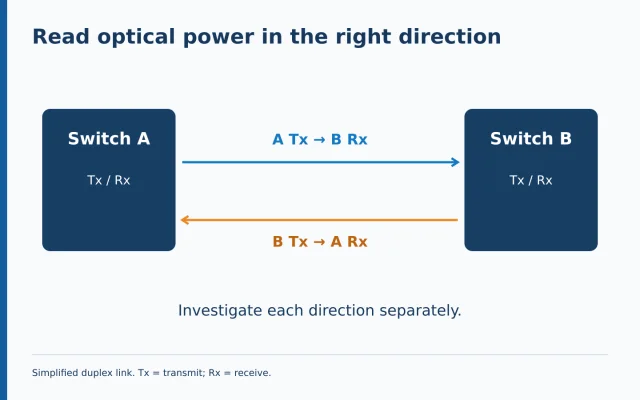
Draw two arrows for a conventional duplex link. The transmitter at endpoint A feeds the receiver at endpoint B; the transmitter at B feeds the receiver at A. This small sketch prevents a common reporting error: comparing a local transmitter and local receiver as if they describe the same light travelling through the same direction.
If B reports a receive-power change, examine the evidence for A’s transmitter and the A-to-B path, while retaining B’s receiver and diagnostics as possibilities. A single abnormal reading does not isolate the faulty component. Record both endpoints together and note whether the reverse direction also changed.
Keep absolute power and loss terminology distinct. A received-power value in dBm describes a power level relative to one milliwatt; a loss value in dB describes a ratio. Fluke Networks explains the power meter’s role in measuring optical signal strength. Do not label a DOM receive reading as measured cable loss without a valid measurement method and reference.
Compare against the correct limits
There is no single “good receive power” number for every transceiver. Use the applicable data sheet and supported host information, including both low and high limits. Preserve the exact model reference with the record so another engineer can verify which limits were used.
Cisco’s port-flap guidance recommends consulting the relevant optics data sheet and discusses warnings for temperature, voltage and optical power. It also addresses forward error correction, or FEC, as a configuration consideration. A link can therefore need investigation beyond the optical power reading alone. Follow the platform-specific procedure rather than switching FEC settings experimentally on a live service.
Avoid declaring a module healthy because one value sits just inside a displayed threshold. Ask whether the readings changed during the event, whether errors accumulated and whether the observed operating conditions are representative. Conversely, do not replace equipment solely because one unverified reading appears unusual. First establish what the measurement and limit actually mean.
Correlate the link with its surroundings
Build a short timeline that includes relevant device and site events. Did the remote device restart? Was power interrupted? Was work taking place at the patch panel? Did the symptom follow a software or configuration change? These questions widen the investigation without asserting that any one event caused the failure.
Use comparable observation periods. A quiet ten-minute check is weak evidence against a problem previously seen during a particular operating condition. Ask what was different during the failure and whether the restored service has experienced that condition again. Record what remains untested rather than calling the issue closed too early.
For field teams in Chennai, Bengaluru and other locations, a shared event timeline can be more useful than several disconnected photographs of green ports. Give each image or reading an endpoint, time and purpose. The aim is to make evidence collected by different people fit the same investigation.
Use independent measurements when they answer a clear question
An optical power meter can provide an independent power measurement when the instrument, connection and settings are suitable. Fluke Networks’ guidance specifies selecting the relevant wavelength for its power-monitoring function. Confirm the meter’s range and procedure for the actual source, rather than assuming every tester is suitable for every optical signal.
State the question before connecting equipment. Are you checking the transmitter output, the power reaching a defined point or a change over time? Record the measurement location and configuration. Disconnecting a live path may interrupt service, so agree the maintenance window and restoration plan with the network owner first.
An OTDR addresses different questions, including the location of events along a fiber. Do not connect a live fiber to an ordinary OTDR port by assumption. EXFO’s OTDR guidance warns that live-fiber testing requires an appropriate setup and port configuration. Follow the actual instrument manual and network procedure. Never look into a fiber or transceiver port to check whether it is active.
Change one variable at a time
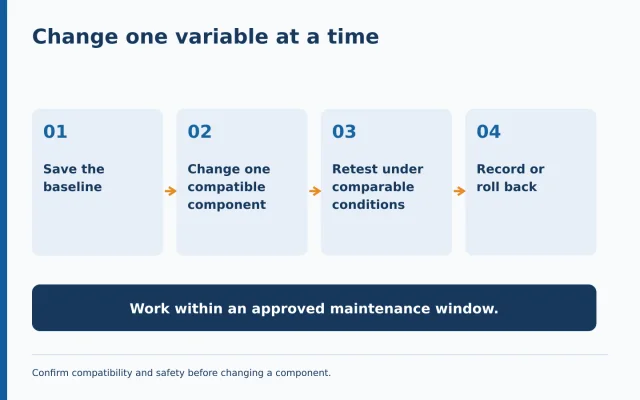
If substitution is justified, agree the test plan before touching the link. Identify a compatible known-good component, the exact element to be changed and the result that would support or weaken the hypothesis. Preserve the original component’s identity so it does not disappear into an unlabelled pile of spares.
Changing both transceivers, both patch cords and the port at once might restore service, but it gives little information about which change mattered. Where operationally practical, make one controlled change and compare the resulting evidence. If several changes are unavoidable to restore an important service, document them honestly and separate recovery from root-cause confirmation.
Keep a rollback route. Confirm the correct port, labeling and connection before and after the intervention, and use the approved handling and inspection procedure. Do not create a second fault while investigating the first. A controlled substitution should reduce uncertainty, not merely replace the current uncertainty with a new configuration.
A hypothetical event review
Imagine a link that drops briefly each afternoon. A normal morning check shows no obvious problem. The team first captures the event and finds that one endpoint’s receive-power reading changes at approximately the same time as the link-down message. That correlation identifies a useful investigation direction, but does not prove cable damage.
The next review brings together the remote transmitter evidence, host events and the relevant directional path. During an approved maintenance window, the team checks one suspected local component using the agreed procedure and records the before-and-after state. If service remains stable, the team still asks whether the earlier failure conditions have recurred.
This is a teaching example, not a Jekath Fibertronics customer case or a guaranteed diagnostic sequence. Its central lesson is to preserve the chain from observation to hypothesis to controlled test. A convincing explanation should account for the evidence, not simply arrive after the last component was swapped.
Quick questions before acting
Can normal DOM readings rule out an intermittent fault? No. They describe the captured moment and have device-specific limitations.
Should a working link be disconnected just to collect a power reading? Not without an agreed operational reason, authorisation and restoration plan.
Is service restoration the same as a confirmed root cause? No. Record what restored service and what evidence still needs to be established.
Send a useful escalation packet
When escalating, include the endpoint identities, exact optics, compatibility references, failure times, logs, diagnostic readings and changes already tested. Attach the relevant measurements rather than an unexplained screenshot. State the current service condition and the precise question that needs support.
A well-prepared packet helps the next team choose the right test equipment and avoid repeating work. It also makes uncertainty visible: what is known, what is suspected and what remains unverified. That is a stronger starting point than asking someone to replace the fiber because a link happened to flap.
Need help selecting fiber test equipment for an intermittent-link investigation? Contact Jekath Fibertronics with the network type, wavelengths, endpoint details and measurements already collected so the equipment discussion starts with the test you actually need.
Sources and further reading
- Jekath Fibertronics: official products and support
- Cisco: Troubleshoot Fiber Links on Catalyst 9000 Series Switches
- Cisco: Troubleshoot Port Flaps on Catalyst 9000 Switches
- Cisco: Digital Optical Monitoring
- Fluke Networks: Monitoring Optical Power
- Fluke Networks: Optical Power Meters and Fault Locators
- EXFO: OTDR User Guide, live-fiber setup precautions
- Cisco: Fiber-optic inspection and laser-safety warnings